WordFace A1–A2 · KeelAI
WordFace: learn words on your Garmin watch
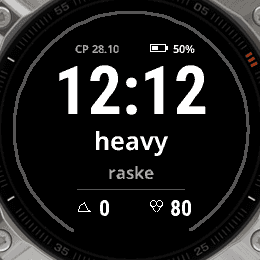
Check the time, review a word. WordFace displays vocabulary and translations on your watch face for short practice throughout the day, without opening your phone.
Free · offline after installation · no account or ads
Choose your language pair
English, Estonian, German, Spanish, French and Russian. Any two different languages: 30 translation directions, with 602 aligned cards per language.
For example: English → Estonian, Russian → German or French → Spanish. This is vocabulary practice, not a conversation lesson.
Getting started
1. Check your watch
Open WordFace in Connect IQ and check compatibility with your Garmin model.
2. Install the watch face
Install through Connect IQ and select it on your watch.
3. Choose two languages
Set the word and translation languages, then choose A1, A2 or both difficulty levels.
4. Set your practice rhythm
Choose translation visibility, card frequency and daily practice hours.
Practice at your pace
- Sport, Minimal and Learning layouts, with light and dark themes.
- 1–50 new cards per day and 5–240 minutes per card.
- Show translations immediately, after a delay or not at all. Review quota: 0%, 25% or 50%.
- English and Russian interface. The 12/24-hour format follows your watch settings.
The daily limit is a maximum, not a guarantee that every card will appear. Progress counts exposure, not demonstrated vocabulary mastery.
Before you install
How can I learn words on a Garmin watch?
Install WordFace on a compatible Garmin watch to see a word and its translation alongside the time. Choose a language pair and review frequency. It is not a phone app or a level test.
Which languages are available?
English, Estonian, German, Spanish, French and Russian. Choose two different languages for a total of 30 translation directions.
Does it need internet or a subscription?
The watch face is free, without ads or an account. Once installed it works offline and does not connect to KeelAI. A phone is needed to download it and configure it through Connect IQ.
Will it work on my watch?
Check the compatible devices list on the WordFace Connect IQ listing before installing. Not every Garmin model is supported.
How is WordFace different from KeelAI on Apple Watch and Wear OS?
WordFace on Garmin displays words and translations offline, without AI conversation. The main KeelAI app on Apple Watch and Wear OS offers AI speaking practice, requiring internet and access under your plan. They are separate apps.
Is this an A1–A2 course?
No. A1–A2 describes approximate editorial vocabulary difficulty. Seeing a card does not prove mastery; the watch face does not issue a CEFR certificate.
Language practice on your watch
Voice and text with an AI tutor on Apple Watch and Wear OS. For Garmin, the separate free WordFace watch face displays words and translations.
Choose a watch app